https://www.concretepage.com/angular-2/angular-2-http-get-parameters-headers-urlsearchparams-requestoptions-example
This page will walk through Angular 2 Http get() parameters + Headers + URLSearchParams + RequestOptions example. Angular Headers class
is used to create headers. Angular URLSearchParams class
is used to create URL parameters. Angular RequestOptions instantiates
itself using instances of Headers, URLSearchParams and
other request options such as url, method, search, body, withCredentials, responseType. These classes are imported from @angular/http API.
Finally Http.get() uses instance of RequestOptions to
interact with the server. Though RequestOptions is optional
to use with Http.get(), but to send request headers
or query/search parameters in the URL, we need to use them. On this page we will create an application that will use Http.get() to
send headers and parameters using angular in-memory web API. Find the code snippet from our example.
getBookById(bookId: string): Observable<Book[]> {
    let myHeaders = new Headers();
    myHeaders.append('Content-Type', 'application/json');
    let myParams = new URLSearchParams();
    myParams.append('id', bookId);
    let options = new RequestOptions({ headers: myHeaders, params: myParams });
    return this.http.get(this.url, options)
	.map(this.extractData)
	.catch(this.handleError);
}
Using set() or append() method
of URLSearchParams and Headers,
we can add multiple parameters and headers, too. Now we will walk through complete example step by step.
Contents
Technologies Used
Find the technologies being used in our example.
1. Angular 4.0.0
2. TypeScript 2.2.0
3. Node.js 6.10.1
4. Angular CLI 1.0.0
5. Angular Compiler CLI 4.0.0
6. [email protected]
Headers
Headers is the angular class that is used to configure request
headers. Find the sample Headers instantiation.
let myHeaders = new Headers();
We can also pass headers as an argument while instantiating Headers class.
Find the code snippet.
let myHeaders = new Headers({ 'Content-Type': 'application/json', 'Cache-Control': 'no-cache' });
To fetch, add and delete headers, Headers class
has following methods.
append(name: string, value: string): Appends a header to existing list of header values for a given
header name. We use append() as follows.
myHeaders.append('Accept', 'text/plain');
myHeaders.append('Accept', ' application/xhtml+xml ');
Now the Accept header
will have the following values.
Accept: text/plain, application/xhtml+xml
set(name: string, value: string|string[]): Sets or overrides header value for given name. It is
used as follows.
myHeaders.set('Accept', ' application/xml ');
Now the Accept header
will have only the following value.
Accept: application/xml
delete(name: string): Deletes all header values for the given name. We use it as follows.
myHeaders.delete('Accept');
get(name: string) : string: Returns first header that matches given name. Find the code snippet.
let acceptHeader = myHeaders.get('Accept');
getAll(name: string) : string[]: Returns list of header values for a given name.
let acceptHeaders = myHeaders.getAll ('Accept');
If we want to add multiple headers, we can achieve it by set() method
as follows.
myHeaders.set('Content-Type', 'application/json');
myHeaders.set('Accept', 'text/plain');
If we want to add multiple headers by append() method,
we can achieve it as follows.
myHeaders.append('Content-Type', 'application/json');
myHeaders.append('Accept', 'text/plain');
URLSearchParams
URLSearchParams creates the query string in the URL. It is a
map-like representation of URL search parameters. Find its constructor syntax.
constructor(rawParams?: string, queryEncoder?: QueryEncoder)
Both arguments in the constructor are optional. Angular queryEncoder parameter
is used to pass any custom QueryEncoder to encode key
and value of the query string. By default QueryEncoder encodes
keys and values of parameter using JavaScript encodeURIComponent() method.
Now we can instantiate URLSearchParams as
given below.
let myParams = new URLSearchParams();
Now we can fetch, add and delete parameters using following methods.
append(param: string, val: string) : void: Appends parameter value to existing list of parameter
values for a given parameter name. It is used to add values in multi-value fields or arrays in query string. If we write the code as given below.
myParams.append('names', 'John');
myParams.append('names', 'David');
Then query parameter names will
be an array. The query string will look like as given below.
?names[]=John&names[]=David
Server side code such as PHP will get names parameter
value as an array.
set(param: string, val: string): Sets or overrides parameter value for given parameter name. We
can use as follows.
myParams.set('names', 'Bob');
The query string will be as follows.
?names=Bob
delete(param: string) : void: Deletes all parameter values for the given parameter name. Find the
code snippet.
myParams.delete('names');
get(param: string) : string: In case of multi-value fields, it returns the first value for given
parameter name. Find the code snippet.
let nameParam = myParams.get('names');
getAll(param: string) : string[]: Returns list of values for a given parameter name. Find the code
snippet.
let namesParam = myParams.getAll('names');
If we want to add multiple parameters, we can achieve it by set() method
as follows.
myParams.set('category', catg);
myParams.set('writer', wtr);
If we want to add multiple parameters by append() method,
we can achieve it as follows.
myParams.append('category', catg);
myParams.append('writer', wtr);
RequestOptionsArgs and RequestOptions
RequestOptionsArgs is an interface that is used to construct
a RequestOptions. The fields of RequestOptionsArgs are
url, method, search, params, headers, body, withCredentials, responseType. RequestOptions is used to create request option. It is instantiated
using RequestOptionsArgs. It contains all the fields
of the RequestOptionsArgs interface. Now find the constructor
of RequestOptions class.
constructor({method, headers, body, url, search, params,
                 withCredentials, responseType}?: RequestOptionsArgs)
In our example we will use following fields.
headers : Sets headers for HTTP request. It is of Headers class
type.
params: Sets query parameters in the URL. It is of URLSearchParams class
type.
Now if we have instance of Headers as
follows.
let myHeaders = new Headers();
myHeaders.append('Content-Type', 'application/json');
And instance of URLSearchParams as
follows.
let myParams = new URLSearchParams();
myParams.append('id', bookId);
Then headers and params can
be passed to RequestOptions as given below.
let options = new RequestOptions({ headers: myHeaders, params: myParams });
Http.get() with Multiple Headers and Multiple Parameters
Angular Http.get() method
performs a request with HTTP GET method. Find the arguments of Http.get() method.
get(url: string, options?: RequestOptionsArgs) : Observable<Response>
url: This is the HTTP URL to hit the server using HTTP GET method.
RequestOptionsArgs: This is optional in Http.get() method.
This is used to create instance of RequestOptions to
send headers, parameters etc with Http.get() method.
Now If we want to add multiple headers, we can do as follows.
let myHeaders = new Headers();
myHeaders.set('Content-Type', 'application/json');
myHeaders.set('Accept', 'text/plain');
If we want to add multiple parameters, we can do as follows.
let myParams = new URLSearchParams();
myParams.set('category', catg);
myParams.set('writer', wtr);
Find the code snippet for Http.get() with
multiple headers and multiple URL parameters.
getBooksAfterFilter(catg: string, wtr: string): Observable<Book[]> {
  let myHeaders = new Headers();
  myHeaders.set('Content-Type', 'application/json');
  myHeaders.set('Accept', 'text/plain');
  let myParams = new URLSearchParams();
  myParams.set('category', catg);
  myParams.set('writer', wtr);
  let options = new RequestOptions({ headers: myHeaders, params: myParams });
  return this.http.get(this.url, options)
	.map(this.extractData)
	.catch(this.handleError);
}
Angular In-Memory Web API
Angular provides in-memory web API to process HTTP request in test environment. In case we don’t have actual server URL, we can use angular in-memory web API for testing our angular Http methods.
It provides a dummy URL which can be changed by actual URL later. It returns an Observable of
HTTP Response object in the manner of a RESTy web api.
In our example we are using in-memory web API to get and post data. To use it in our angular application we need to follow below steps.
Step-1: Add angular-in-memory-web-api in dependencies block
in package.json file as given below.
"angular-in-memory-web-api": "~0.3.2"
Step-2: Run npm
install command to download angular-in-memory-web-api.
Step-3: Create a class implementing InMemoryDbService interface.
In our example we are creating an in-memory DB for books. Find our class for our in-memory DB.
book-data.ts
import { InMemoryDbService } from 'angular-in-memory-web-api';

export class BookData implements InMemoryDbService {
  createDb() {
    let books = [
      { id: '1', name: 'Angular 2 by Krishna', category: 'Angular', writer: 'Krishna' },
      { id: '2', name: 'AngularJS by Krishna', category: 'Angular', writer: 'Krishna' },
      { id: '3', name: 'Angular 2 by Vishnu', category: 'Angular', writer: 'Vishnu' },
      { id: '4', name: 'Core Java by Vishnu', category: 'Java', writer: 'Vishnu' },
      { id: '5', name: 'JSP & Servlet by Vishnu', category: 'Java', writer: 'Vishnu' },
      { id: '6', name: 'JPA by Vishnu', category: 'Java', writer: 'Vishnu' },
      { id: '7', name: 'Hibernate by Krishna', category: 'Hibernate', writer: 'Krishna' }
    ];
    return {books};
  }
}
To interact with DB, URL will be api/books .
Step-4: Before using DB we need to configure our above class in application module using imports metadata
of @NgModule as follows.
InMemoryWebApiModule.forRoot(BookData)
Find the application module.
import { InMemoryWebApiModule } from 'angular-in-memory-web-api';
import { BookData } from './book-data';

@NgModule({
---------
  imports: [
        BrowserModule,
	HttpModule,
	InMemoryWebApiModule.forRoot(BookData)
  ]
---------
})
Find the link for
more information on in-memory web API.
Complete Example
Find the complete example.
book.service.ts
import { Injectable } from '@angular/core';
import { Http, Response, Headers, URLSearchParams, RequestOptions } from '@angular/http';
import { Observable } from 'rxjs';

import { Book } from './book';

@Injectable()
export class BookService {
    url = "api/books";
    constructor(private http:Http) { }
    getAllBooks(): Observable<Book[]> {
        return this.http.get(this.url)
		 .map(this.extractData)
		 .catch(this.handleError);
    }
    getBookById(bookId: string): Observable<Book[]> {
	let myHeaders = new Headers();
	myHeaders.append('Content-Type', 'application/json');
	let myParams = new URLSearchParams();
	myParams.append('id', bookId);
        let options = new RequestOptions({ headers: myHeaders, params: myParams });
        return this.http.get(this.url, options)
	        .map(this.extractData)
	        .catch(this.handleError);
    }
    getBooksAfterFilter(catg: string, wtr: string): Observable<Book[]> {
	let myHeaders = new Headers();
	myHeaders.set('Content-Type', 'application/json');
	let myParams = new URLSearchParams();
	myParams.set('category', catg);
	myParams.set('writer', wtr);
        let options = new RequestOptions({ headers: myHeaders, params: myParams });
        return this.http.get(this.url, options)
	        .map(this.extractData)
	        .catch(this.handleError);
    }
    private extractData(res: Response) {
	let body = res.json();
        return body.data;
    }
    private handleError (error: Response | any) {
	console.error(error.message || error);
	return Observable.throw(error.message || error);
    }
}
book.component.ts
import { Component, OnInit } from '@angular/core';
import { NgForm } from '@angular/forms';

import { BookService } from './book.service';
import { Book } from './book';

@Component({
   selector: 'app-book',
   templateUrl: './book.component.html',
   styleUrls: ['./book.component.css']
})
export class BookComponent implements OnInit {
   allBooks: Book[];
   book: Book;
   filteredListOfBooks: Book[];
   errorMessage: String;
   dataAvailableById= true;
   dataAvailableAfterFilter= true;
   categories = [
                 {name: 'Angular'},
                 {name: 'Hibernate'},
		 {name: 'Java'}
		];
   writers = [
               {name: 'Krishna'},
               {name: 'Vishnu'}
             ];
   constructor(private bookService: BookService) { }

   ngOnInit(): void {
        this.getAllBooks();
   }
   getAllBooks() {
        this.bookService.getAllBooks()
	  .subscribe(
                data => this.allBooks = data,
                error =>  this.errorMessage = <any>error);
   }
   getBookById(bookId: string) {
        this.dataAvailableById= true;
	this.book = null;
        this.bookService.getBookById(bookId)
	    .subscribe(
                data => {
        	    if(data.length > 0) {
		        this.book = data[0];
		    } else {
			this.dataAvailableById= false;
		    }
	        },
                error =>  this.errorMessage = <any>error
	     );
   }
   getBooksAfterFilter(category: string, writer: string) {
        this.dataAvailableAfterFilter= true;
	this.filteredListOfBooks = null;
        this.bookService.getBooksAfterFilter(category, writer)
	  .subscribe(
                data => {
		    if(data.length > 0) {
		        this.filteredListOfBooks = data;
		    } else {
			this.dataAvailableAfterFilter= false;
		    }
		},
                error =>  this.errorMessage = <any>error
	  );
   }
   bookById(bookByIdForm: NgForm) {
	  let bookId = bookByIdForm.controls['bookId'].value;
	  this.getBookById(bookId);
   }
   filterBooks(bookByIdForm: NgForm) {
         let catg = bookByIdForm.controls['category'].value;
	 let wtr = bookByIdForm.controls['writer'].value;
	 this.getBooksAfterFilter(catg, wtr);
   }
}
book.component.html
<h3>Book Details</h3>
<table>
  <tr><th> Id</th> <th>Name</th><th>Category</th><th>Writer</th></tr>
  <tr *ngFor="let bk of allBooks" >
    <td>{{bk.id}}</td> <td>{{bk.name}}</td> <td>{{bk.category}}</td> <td>{{bk.writer}}</td>
  </tr>
</table>
<h3>Get Book by ID </h3>
<div>
  <form #bookByIdForm= "ngForm" (ngSubmit)="bookById(bookByIdForm)">
	 <div>
	  Enter Book Id: <input name="bookId" ngModel required #bookId="ngModel">
	 </div>
	 <div> <br/>
	   <button [disabled]="bookByIdForm.invalid">Submit</button>
	 </div>
  </form>
</div>
<br/>
<div *ngIf="bookByIdForm.submitted">
    <div *ngIf="book; else loading">
	<table>
	  <tr><th> Id</th> <th>Name</th><th>Category</th><th>Writer</th></tr>
	  <tr>
		<td>{{book.id}}</td> <td>{{book.name}}</td> <td>{{book.category}}</td> <td>{{book.writer}}</td>
	  </tr>
	</table>
    </div>
    <ng-template #loading>
	<div *ngIf="dataAvailableById; else notAvailable">
	       Loading data...
	</div>
	<ng-template #notAvailable> Data not Aavailable. </ng-template>
    </ng-template>
</div>
<h3>Filter Books </h3>
<div>
  <form #filterBookForm= "ngForm" (ngSubmit)="filterBooks(filterBookForm)">
        <div>
	  Category:
	  <select name="category" ngModel>
             <option value="" disabled>Select a Category</option>
             <option *ngFor="let category of categories" [ngValue]="category.name">
                {{ category.name }}
             </option>
          </select>
	</div> <br/>
	<div>
	  Writer:
	  <select name="writer" ngModel>
            <option value="" disabled>Select a Writer</option>
            <option *ngFor="let writer of writers" [ngValue]="writer.name">
               {{ writer.name }}
            </option>
          </select>
	</div>
	<div><br/>
	   <button>Submit</button>
	</div>
  </form>
</div>
<br/>
<div *ngIf="filterBookForm.submitted">
    <div *ngIf="filteredListOfBooks; else loading">
	<table>
	  <tr><th> Id</th> <th>Name</th><th>Category</th><th>Writer</th></tr>
	  <tr *ngFor="let bk of filteredListOfBooks" >
		<td>{{bk.id}}</td> <td>{{bk.name}}</td> <td>{{bk.category}}</td> <td>{{bk.writer}}</td>
	  </tr>
	</table>
    </div>
    <ng-template #loading>
	<div *ngIf="dataAvailableAfterFilter; else notAvailable">
	       Loading data...
	</div>
	<ng-template #notAvailable> Data not Aavailable. </ng-template>
    </ng-template>
</div>

<div *ngIf="errorMessage" [ngClass] = "'error'"> {{errorMessage}} </div>
book.component.css
table {
    border-collapse: collapse;
}
table, th, td {
    border: 1px solid black;
}
.error{
    color: red;
    font-size: 20px;
}
book.ts
export class Book {
   id: string;
   name: string;
   category: string;
   writer: string;
   constructor() {
   }
}
app.component.ts
import { Component } from '@angular/core';

@Component({
   selector: 'app-root',
   template: `
		<app-book></app-book>
             `
})
export class AppComponent {

}
app.module.ts
import { NgModule } from '@angular/core';
import { BrowserModule } from '@angular/platform-browser';
import { FormsModule } from '@angular/forms';
import { HttpModule } from '@angular/http';
import { InMemoryWebApiModule } from 'angular-in-memory-web-api';

import { AppComponent }  from './app.component';
import { BookComponent }  from './book.component';
import { BookService } from './book.service';
import { BookData } from './book-data';

@NgModule({
  imports: [
        BrowserModule,
	HttpModule,
	FormsModule,
	InMemoryWebApiModule.forRoot(BookData)
  ],
  declarations: [
        AppComponent,
	BookComponent
  ],
  providers: [
        BookService
  ],
  bootstrap: [
        AppComponent
  ]
})
export class AppModule { }
Run Application
To run the application, find following steps.
1. Download source code using download link given on this page.
2. In your angular CLI application, replace src folder.
3. Add "angular-in-memory-web-api": in dependencies block
"~0.3.2"
in package.json file.
4. Run npm install and
then run ng serve .
5. Now access the URL http://localhost:4200 .
Find the print screen.
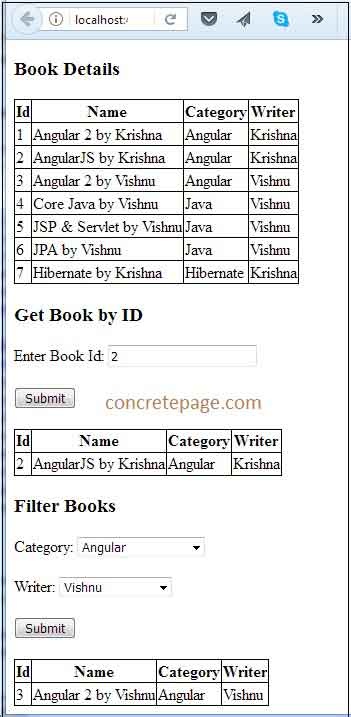
Find the link for Angular 2 Http CRUD
operation with Spring Boot.
Spring Boot REST + Angular
2 + JPA + Hibernate + MySQL CRUD Example
References
Http
Headers
URLSearchParams
RequestOptions
Angular 2 Http post() Example