kvm创建虚拟机报错:
qemu-img create -f qcow2 /tmp/centos.qcow2 10G
virt-install –virt-type kvm –name centos –ram 1024 –disk /tmp/centos.qcow2,format=qcow2 –network network=default –graphics vnc,listen=0.0.0.0 –noautoconsole –os-type=linux –os-variant=centos7.0 –location=/usr/local/src/CentOS-7-x86_64-Minimal-1804.iso
ERROR Host does not support domain type kvm for virtualization type ‘hvm’ arch ‘x86_64’
解决方法:
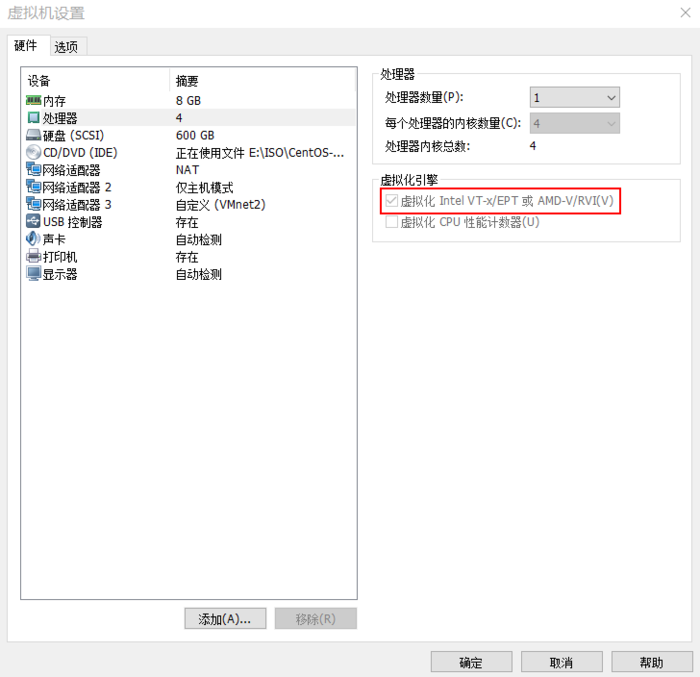
根本原因是CPU没有开启虚拟化
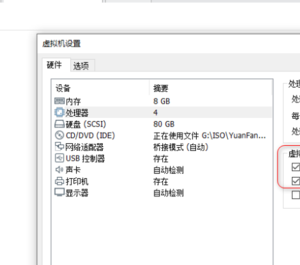
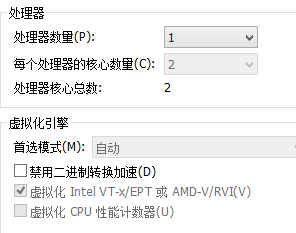
执行grep -E “(vmx|svm)” /proc/cpuinfo,可以看CPU有没有开启虚拟化,VMware workstation也可以开启虚拟机,打上下面红色框的勾即可
1.modprobe kvm
2.去掉–virt-type kvm参数即可。