https://technet.microsoft.com/en-us/library/bb397374(v=exchg.80).aspx
Install the IIS 6.0 Management Compatibility Components in Windows 7 or in Windows Vista from Control Panel
-
Click Start, click Control Panel, click Programs and Features, and then click Turn Windows features on or off.
-
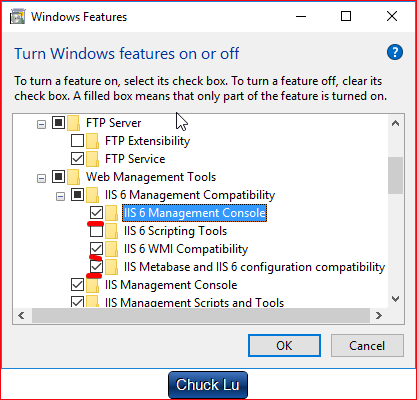
Open Internet Information Services.
-
Open Web Management Tools.
-
Open IIS 6.0 Management Compatibility.
-
Click to select the IIS 6 Metabase and IIS 6 configuration compatibility, IIS 6 WMI Compatibility, and IIS 6 Management Console check boxes.
-
Click OK.
需要注意的是,一共要勾选3个。